
OnlyFans free pages are easier to judge once you know which signals actually matter. If you are wondering what happens to your subscription on OnlyFans after you switch auto-renew off, the short answer is that nothing disappears immediately.

Cancelling auto-renew is not the same as cancelling an account. It is a billing instruction, not a deletion command. Your subscription stays active for the remaining days you have already paid for.
What auto-renew actually controls
Auto-renew controls one thing only: whether the platform charges your payment method again at the end of the current cycle. It does not control your access, and it does not remove the creator from your subscriptions list. Turning it off simply breaks the loop before the next charge is triggered.
Most paid subscriptions sit between $4.99 and $15 per month, with an average of $5 to $10. The platform minimum is $4.99, and the maximum is $49.99. There is no base price below $4.99, though promotional first months from some creators can dip under that figure.
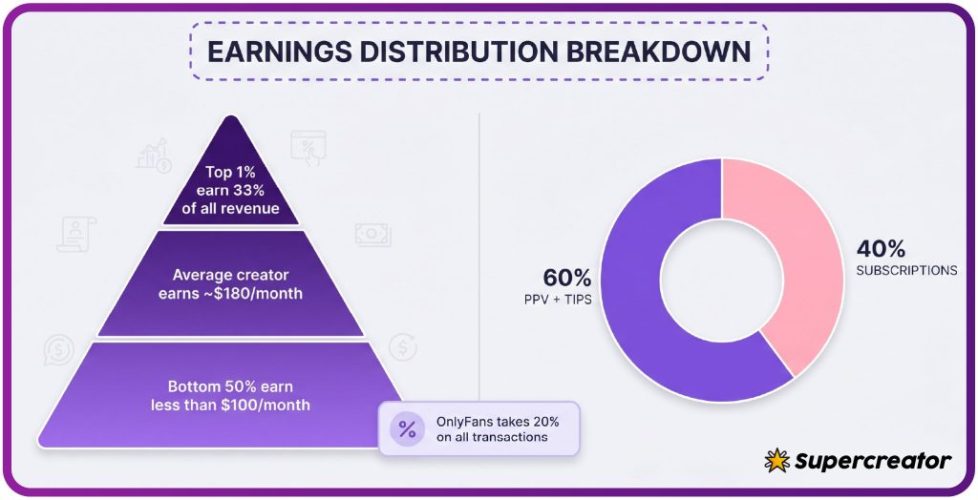
The platform takes a 20% fee on subscriptions, tips, and pay-per-view messages. Creators keep the other 80%. That split does not change when you cancel, and it does not affect your access window.
- Monthly subscription charge: $4.99 to $49.99, average $5 to $10.
- Tips: optional, sent at any time, subject to the same 20% platform fee.
- Pay-per-view messages: optional unlock fees set by the creator.
- Renewal charge: only applied if auto-renew is still switched on.
Turning auto-renew off is reversible. You can switch it back on at any point before the period ends and the next charge will process normally. Nothing about your subscription history is erased by the toggle itself.

The cancellation-to-access timeline
When you switch auto-renew off, the change takes effect immediately for billing purposes. The access you already bought runs to the end of the paid period. There is no refund for the unused remainder, and no early cut-off.
The exact end date depends on your billing cycle start date, not on the day you cancelled. If you subscribed on the 8th, your access ends on the 8th of the following month in most cases. Cancelling on the 20th does not move that date forward.
Practical tip: note the exact renewal date shown in your subscription settings before you cancel. That single date is the only one that matters for access, and it is easy to lose track of it weeks later.
| Subscription start date | Cancelled on | Access ends |
|---|---|---|
| 3rd of the month | 9th of the same month | 3rd of the next month |
| 14th of the month | 15th of the same month | 14th of the next month |
| 27th of the month | 2nd of the next month | 27th of the next month |
| 1st of the month | 28th of the previous month | 1st of the current month |
The table above assumes a standard monthly cycle. Some creators use different recurring periods, so always check the date shown on your own subscription page. The pattern holds either way: cancellation day and access end day are separate.

What stays visible after access ends
Once the paid period finishes, your access to that creator’s page closes. The page itself still exists and remains searchable if you know where to look. What changes is your ability to open posts, read messages, and view paid media.
Direct messages you exchanged are generally not retrievable at full detail after access ends. Media you unlocked through pay-per-view sits in the same position. Anything you saved locally before the period ended stays on your device.
- Pay-per-view media you unlocked during the period.
- Direct message threads with the creator.
- Subscriber-only posts and locked feed content.
- Comment visibility and any subscriber badge on your profile.
Your subscription entry may still appear in your own list for a while. Some users report it lingering as an expired record. That entry is a pointer, not a key, so it does not restore access on its own.

Timing a cancellation around a price change
Creators can change their subscription price at any time. When the price goes up, auto-renew stops automatically and existing access lasts until the current paid period ends. You are not charged the new amount unless you re-subscribe at the higher price.
When the price goes down, the change applies to new subscriptions and to renewals at the creator’s discretion. Check the next charge amount in your subscription settings if you want certainty. Screenshot it, because the figure can change between visits.
Warning: a raised price does not retroactively charge you. It quietly ends your renewal. Many subscribers assume they were charged the new rate when in fact they simply lost auto-renew.
- Assuming a price increase charged you immediately, when it actually ended your renewal.
- Cancelling twice because the first attempt looked like it did not save.
- Forgetting that a promotional first month converts to the standard rate at renewal.
- Missing the access end date because you tracked the cancellation date instead.
If you plan to leave, cancelling before a price change is usually simpler than cancelling after. Either way, the charge you already paid stands and the access window does not shrink. For a starting point, best vpn for onlyfans reddit collects free pages.

Re-subscribing after a break
Rejoining a page after a break is straightforward. You subscribe again at the current listed price, and access resumes from the new payment. The old billing cycle does not carry over, and no credit is applied for unused days.
Your message history with that creator may reappear once you are subscribed again. That depends on how the platform retains the thread on its side. Media you unlocked previously often requires a fresh unlock or is simply gone from view.
Before paying again, confirm the current price and the renewal date. Prices can move between visits, and a page that was $4.99 may now sit higher. Recording both figures avoids a surprise at the next cycle.
- Current subscription price and any active promotion.
- Renewal date the platform shows after payment.
- Whether the page is still posting actively.
- Whether your old message thread returned.
Ranking sites exist because OnlyFans has no built-in discovery feed or directory. That absence is why so many subscribers rely on curated lists, including resources like BestOnlyFans, to find pages worth the monthly fee in the first place.
Practical tip: if you only want one month, subscribe, cancel auto-renew the same day, and keep the confirmation screen. That sequence gives you the full period with no second charge.

Cancelling on a free page versus a paid page
A free page has its price set to $0. There is no recurring charge to switch off, so the cancel option either does not appear or has nothing to act on. Creators on free pages earn through pay-per-view messages and tips instead of subscriptions.
A paid page always has a recurring charge, so the auto-renew toggle is the control that matters. Turning it off ends the next charge but keeps the current period intact. The two flows look similar in the interface but behave differently in practice.
| Feature | Free page | Paid page |
|---|---|---|
| Recurring charge | None | $4.99 to $49.99, average $5 to $10 |
| Auto-renew toggle | Not applicable | Available and active |
| Creator earnings | Pay-per-view and tips | Subscriptions, tips, pay-per-view |
| Access after leaving | Ends when you unfollow | Ends when the paid period finishes |
On a free page, leaving is closer to unfollowing. On a paid page, leaving is a two-step process: stop the renewal, then wait out the period. Confusing the two is one of the most common reasons subscribers think they were charged after cancelling.
If you are unsure which type of page you are on, check whether a price is shown next to the subscribe button. A blank or zero figure means free. Any dollar amount means a paid subscription with a renewal cycle attached.
Recording the date so you are not charged twice
The simplest habit is to write the access end date somewhere you will see it again. A calendar entry a day before the date works well. That reminder gives you time to decide whether to renew or let it lapse.
Screenshots are the second habit worth building. They settle any dispute about what the settings said at the moment you cancelled. Platforms update their interfaces, and a screenshot is proof of the state you saw.
If you plan to compare alternatives later, a quick note on what each page offered helps. Guides such as BestOnlyFans collect free and low-cost pages in one place, which cuts the time spent hunting for replacements.
- The subscription settings screen showing auto-renew switched off.
- The renewal or access end date shown on the page.
- The last payment receipt with the amount and date.
- Any price change notice from the creator.
For anyone comparing paid options or securing access across regions, a resource like best vpn for onlyfans reddit is often mentioned alongside billing guides. Keep in mind that a VPN changes your connection, not your subscription status or your renewal date.
None of these habits cost anything, and together they take under a minute. That minute is usually the difference between a clean exit and a duplicate charge you have to chase.
A final note on paid ranges: the spread from $4.99 to $49.99 is wide, but most pages cluster in the lower half. Setting expectations around $5 to $10 per month keeps budgeting realistic, and it makes a price increase easier to spot when it arrives.
BestOnlyFans-style directories help with discovery, but they do not manage billing. The renewal toggle, the end date, and your own records are the three things that decide what you pay next. Check them before every cycle and the process stays predictable.
FAQ
Does cancelling auto-renew remove my access straight away?
No. Access continues until the paid period ends, and the exact date is shown in your subscription settings.
Will I get a refund for the unused days?
No. The current period is not refunded when you switch auto-renew off before it finishes.
What happens if the creator raises the price?
Auto-renew stops automatically and your existing access lasts until the current paid period ends.
Can I turn auto-renew back on later?
Yes, as long as the current period has not ended, the next charge will process normally.